Free, with no adverts. Android 10 or later.How to install
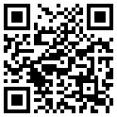
Scan with your phone's camera to open this page there.
About WikiMe
All of Wikipedia. Nobody watching.
WikiMe is a reader for Wikipedia and nothing else. It talks only to Wikipedia's own servers, never shows a web address, and turns every article into a calm, beautiful page with a large photo, book-style type and a facts box you can actually read.
It is private from end to end: encrypted address lookups, an optional Tor switch, and saved articles, history and highlights encrypted on your phone. There is no account, no advert and nothing that tracks you.
Only WikipediaIt cannot reach any other site.
No advertsNone in the app and none on this site.
Nothing to buyEvery feature is free, with nothing locked.
No accountNothing to sign up for.
A look inside
Real screens from WikiMe. Tap one to see it full size.
The opening screen: points of light drift together into the WikiMe constellation.Explore: today's featured article, picture of the day, the news, on this day and the most read.An article: a large photo, book-style type and a contents button that knows where you are.The same article in the Night theme. There are also Paper, Sepia and Black.Maths and diagrams stay sharp. This is the Black theme.Contents: jump to any section, with the one you are reading marked.Highlights and notes in four colours, kept encrypted on the phone.Search with pictures as you type, and inside articles too.Saved articles with their pictures, for reading with no signal, in your own lists.History, kept for as long as you choose, with private reading a tap away.Reading settings: five themes, text size, serif or sans, spacing and more.Nearby: articles about places around you, on a compass. Off until you agree.App lock with a PIN or fingerprint.Home screen widgets: featured article, on this day and a search bar.
X-ray
Read from the app file itself (v1.0.2, 24.9 MB) when it was published.
Privacy score
The score starts at 100. Points come off for advert kits (10 each), trackers (8 each), high-risk permissions (6 each), medium-risk permissions (3 each), parts of the app other apps can start (2 each, up to 10), and unencrypted traffic (5). A permission only works if you allow it, so a camera app loses points for the camera even though it needs it.
94/ 100
Excellent
2 medium-risk permissions-6
Advertising kits
0
Code from advertising companies that shows adverts and usually collects data to target them. Found by matching the app's code against the Exodus Privacy list of known kits.
No known advertising kits found.
Trackers
0
Analytics, crash-reporting, profiling and location libraries that can send information about you to another company. Matched against 432 known trackers.
No known trackers found.
Permissions
10
What the app is able to ask for. Permissions marked "Asks first" do nothing until you say yes on your phone, and you can take them back at any time in Settings. "Automatic" ones are granted when you install.
Backup allowedThe app's data cannot be copied off with backup tools.
Modern Android targetBuilt for Android 15 (API 35) — gets current privacy protections.
Open background componentsNo background parts can be started by other apps.
Release signatureSigned with a release key.
Signature
Android only installs an update if it carries the same signature as the app already on your phone. These fingerprints let you check a file really came from here.
The building blocks inside the app. "Open" parts can be started by other apps on the phone without asking. Widgets, share targets and alarms need some open parts to work.
Screens2 open2
uk.jj.wikime.MainActivity
uk.jj.wikime.LookupActivity
Services1
uk.jj.wikime.speech.ReadAloudService
Receivers4
uk.jj.wikime.widgets.FeaturedWidget
uk.jj.wikime.widgets.OnThisDayWidget
uk.jj.wikime.widgets.SearchWidget
androidx.profileinstaller.ProfileInstallReceiver
Providers1
androidx.startup.InitializationProvider
Native libraries
4
Compiled code for each type of phone processor. Most phones today use arm64-v8a.
WikiMe fetches articles straight from Wikipedia and rebuilds each one on your phone, so nothing else ever loads.
Open it
Today's Wikipedia is waiting on Explore. Search, tap the dice for a random article, or shake the phone.
Read
Every article is rebuilt as a clean page: no web addresses, no Wikipedia scripts, nothing from anywhere else.
Keep it
Save an article with its pictures for reading offline, highlight the parts that matter, or have it read aloud.
Everything is in, and all of it is free
Nothing below is held back for a paid tier, because there is no paid tier.
Reading
A page made for reading
A large photo header, book-style serif type, the facts box as a tidy card and folding sections.
Five themes
Auto, Paper, Sepia, Night and Black, with text size, serif or sans, spacing and justify.
Notes and previews
Tap a note number for its source, long-press a link for a preview card, find in page.
Read aloud
Your phone's own offline voice reads the article, with lock-screen controls and speed.
Private by default
Only Wikipedia
Every other site is refused, three times over, and the connection is pinned to Wikipedia's certificates.
Tor switch
One switch sends everything through Tor. Nothing is sent until Tor has connected.
Encrypted lookups
Address lookups are encrypted, so the network cannot see which pages you read.
No web addresses
Links that leave Wikipedia ask first and show only the site's name.
Yours to keep
Saved articles
Kept with their pictures for reading with no signal, in reading lists you name.
Highlights and notes
Four colours and your own notes, all in one list.
History your way
Kept for a day, a week, 30 days, 90 days or always, or switch on private reading.
All encrypted
Saved articles, pictures, history and highlights are encrypted with a key held in the phone's secure hardware.
Everywhere
44 languages
Any article in every language that has it, with right-to-left languages laid out properly.
Nearby
Articles about places around you, on a compass and a list. Off until you agree.
Look up in WikiMe
Select a word in any app and a summary card slides up.
Widgets, lock and tablets
Three home screen widgets, an app lock, screenshot blocking and a tablet layout.
Private by design
Only Wikipedia, ever
WikiMe cannot reach any site but Wikipedia's own. No adverts, analytics, crash reports or Google services.
Tor when you want it
Switch Tor on and every request goes through it, by name, so the phone never looks an address up itself.
Encrypted on the phone
Saved articles, pictures, history and highlights are encrypted with AES-256 and a key the phone will not let out.
Where WikiMe comes out ahead
WikiMe reads the same Wikipedia, with privacy and protection built in. This page shows only the rows where WikiMe does more, using what the other apps' own Google Play listings say.
Feature
WikiMeFree, no paid version
WikipediaWikimedia Foundation
KiwixKiwix Team
Tor built in
YesOne switch, off by default
–
–
Encrypted address lookups
Yes
–
–
Saved articles encrypted on the phone
YesKey held in the phone's secure hardware
–
–
App lock
YesPIN or fingerprint
–
–
Screenshot blocking and hide from recent apps
Yes
–
–
Private reading and history that clears itself
Yes
–
–
Highlights and notes
YesEncrypted
–
–
Read aloud
YesThe phone's own offline voice
–
–
Today's Wikipedia with no big download first
Yes
Yes
Download content firstRead offline from then on
Never shows a web address
YesReads like a book, not a browser
–
–
Other apps' details are taken from their own Google Play listings. Only the rows where WikiMe does better are shown.
What's new
Every version, newest first. Earlier versions stay available to download.
Version 1.0.2Latest
Fixes articles saying you were offline with Tor switched on. WikiMe now talks to Tor directly and hands it the site's name, so it works the same on every phone.
With Tor on, pages get more time to arrive, and a Tor hiccup is reported as Tor rather than as being offline.
Version 1.0.1
Fixes articles not opening on some phones: the page now loads straight from the app every time.
First release. A private reader for Wikipedia that talks only to Wikipedia and never shows a web address.
Explore: featured article, picture of the day, in the news, on this day, most read and did you know.
Article reader with a photo header, book-style type, a facts box card, folding sections, note pop-ups, link previews, find in page and a full-screen picture viewer.
Five themes, text size, serif or sans, spacing and justify. Data saver and text only.
Optional Tor switch, encrypted address lookups and certificate pinning to Wikipedia.
Saved articles with pictures for offline reading, reading lists, history with private reading, and highlights with notes, all encrypted on the phone.
44 languages, and any article in every language that has it.
Read aloud, Nearby, Look up in WikiMe from other apps, shake for a random article and three home screen widgets.
App lock with a PIN or fingerprint, screenshot blocking, hide from recent apps and a tablet layout.
Yes. There is no paid version, no subscription and no adverts, and nothing in the app is locked.
Is it made by Wikipedia?
No. WikiMe is an independent app that reads Wikipedia. The articles are written by Wikipedia's volunteers and shared under Wikipedia's own licence, which WikiMe credits on every article and when you share.
Is it on Google Play?
No. WikiMe is a personal project and is downloaded from this site as an Android app file. It needs Android 10 or later.
Why does it never show web addresses?
So it reads like a book, not a browser. Links inside Wikipedia open in WikiMe. A link to any other site asks first, shows only the site's name, and opens in your phone's own browser.
What does the Tor switch do?
When it is on, every request goes through the Tor network, so Wikipedia and your network cannot link what you read to you. It is off by default because Tor is slower. While Tor is connecting, nothing is sent at all.
Can I read without a signal?
Yes. Tap the bookmark on any article to save it with its pictures. Saved articles open with no connection, and can be updated whenever you like.
What does Nearby send?
Only when you ask, and only after you agree: your approximate position, rounded to about a kilometre, is sent once to Wikipedia to find articles about places nearby. It is never stored.
Can I edit Wikipedia with it?
No. WikiMe is for reading. It has no account and no sign-in, so there is nothing that can be linked to you.
Does it work on an iPhone?
No. WikiMe is for Android phones and tablets only.
Who made it?
WikiMe is made by Jonathan Jackson, an independent developer in the United Kingdom.
Your download has started. Three quick steps the first time.
Open the fileTap the download notification, or open Files and then Downloads, and tap WikiMe.apk.
Allow your browser to install appsAndroid asks once. Tap Settings, switch on Allow from this source, then go back. On a Samsung phone it's under Settings, Apps, Chrome (or Samsung Internet), Install unknown apps.
Tap InstallUpdates install over the top and keep your data, because every version is signed with the same key.
Chrome may warn you. It says "file might be harmful" for any app that doesn't come from Google Play. Choose Download anyway. You can check the file against the SHA-256 on this page.